Amazon Flex delivery partner safety
Learn about how to connect with live support, access emergency help, and get helpful safety tips.
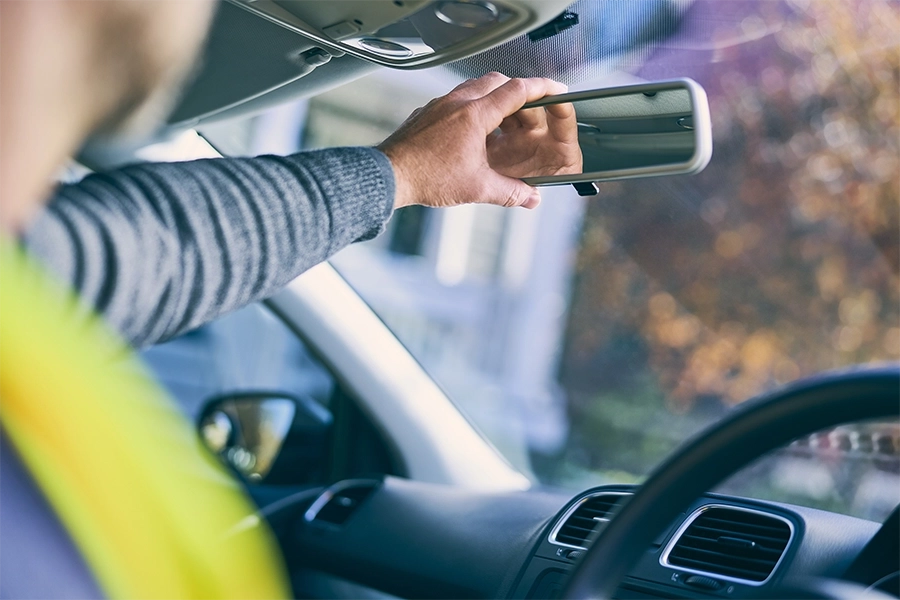

Deliver with safety, confidence, and support.
Our deep commitment to safety guides our approach to everything at Amazon Flex. Here are some of the ways we prioritize safety so you can earn and deliver with confidence.

Safe deliveries in the community
Safety first
You are in the driver's seat when delivering with Amazon Flex, and your safety is our top priority. If you arrive at a delivery location and do not feel safe, you can contact Driver Support through the Amazon Flex app. We don't expect you to ever make a delivery if you feel unsafe.
Safety recommendations
Everyone at stations must wear reflective high-visibility safety vests, and closed-heel-and-toe shoes. If you don't have a high-visibility, reflective safety vest, you can request one at the station (DFE2) free of charge. This policy is applicable when onsite at the Amazon delivery station. To enhance your safety, we strongly recommend you wear the safety vest and closed-heel-and-toe shoes when making deliveries to help ensure you are safe and visible at all times.
Customer and community accountability
If you have a safety concern, you can report it to Driver Support through the Amazon Flex app. Reporting incidents to Driver Support helps us research and follow up on them, to help keep you safe, and hold customers and community members accountable.
Anti-harassment policy
At Amazon, we believe everyone should be treated with respect and dignity. We do not tolerate inappropriate conduct, including discrimination or harassment, from anyone.
Support when you drive and deliver
Dedicated support
Our Driver Support team is there for you if you ever need help when delivering. You can quickly connect with Driver Support through the Amazon Flex app, and speak or live chat with someone from our dedicated team.
Emergency assistance
If you have an emergency when you’re delivering, the Emergency Help button is easy to access from the main menu in the Amazon Flex app. The Emergency Help button offers the option to contact 999 or the Amazon Emergency Helpline for assistance in reporting a safety concern or accident. Always call 999 before contacting the Amazon Emergency Helpline if you need emergency services.
Safety advice at your fingertips
You have on-demand access to safety videos and articles in the Amazon Flex app. Anytime you’d like to review safety advice, just go to the Learning Portal from the main menu to find safety related materials. The safety section in the Learning Portal contains useful information to help keep you safe while delivering. You can choose whatever content you find most helpful.
Write in to Driver Support here.
Technology to help you stay safe
Pet alerts
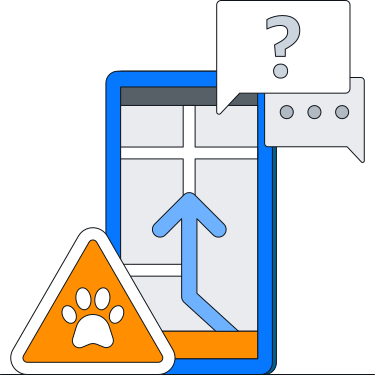
You can check the Amazon Flex app for a paw print icon to see if there might be a dog at your next delivery stop. These paw print icons are added into the Amazon Flex app through the help of our customers and delivery partners who report this information. The Amazon Flex app also provides safety videos, articles, and information on pet safety support on how to stay safe when a dog or a pet is present.
Optimized maps
Amazon Flex maps help you navigate and show known speed limits, road closure alerts, and live traffic conditions, so you can choose which route to take. You can also choose to set your maps in dark mode to reduce eye strain and help make the screen easier to read, especially at night. Additionally, you can download offline maps to your phone, and even set your device to have the Amazon Flex app automatically download offline maps whenever you are connected to Wi-Fi. This helps you to reliably get where you’re going no matter what mobile coverage is offered in the area.
Customer chat
You can call or text customers about their delivery through the Amazon Flex app. To protect your personal information, we keep your phone number hidden and customers see only an Amazon number.
Protection for you and your vehicle
Motor insurance
While delivering with Amazon Flex, you are protected under Amazon’s Commercial Motor Insurance policy. This insurance is provided to you to supplement your own auto insurance policy at no extra cost. It includes:
• Third-party liability coverage: This covers another party’s injuries and property damages.
• Contingent loss or damage coverage: As long as you have coverage for loss of, or damage to, your own vehicle as part of your personal auto insurance policy, Amazon’s Motor Insurance policy provides loss and/or damage coverage.
Work Injury Compensation insurance
While delivering with Amazon Flex, you are protected under Amazon's Work Injury Compensation insurance. It provides financial protection in case you sustain accidental injuries, death, and occupational diseases while delivering with Amazon Flex. See what protection you receive.
Managing Fatigue
Being well-rested helps you stay safe on the road and can prevent fatigue-related incidents.
If you notice signs of fatigue while driving, pull over safely and take a break.
Learn more about managing fatigue here.
Safe deliveries in the community
Safety first
You are in the driver's seat when delivering with Amazon Flex, and your safety is our top priority. If you arrive at a delivery location and do not feel safe, you can contact Driver Support through the Amazon Flex app. We don't expect you to ever make a delivery if you feel unsafe.
Safety recommendations
Everyone at stations must wear reflective high-visibility safety vests, and closed-heel-and-toe shoes. If you don't have a high-visibility, reflective safety vest, you can request one at the station (DFE2) free of charge. This policy is applicable when onsite at the Amazon delivery station. To enhance your safety, we strongly recommend you wear the safety vest and closed-heel-and-toe shoes when making deliveries to help ensure you are safe and visible at all times.
Customer and community accountability
If you have a safety concern, you can report it to Driver Support through the Amazon Flex app. Reporting incidents to Driver Support helps us research and follow up on them, to help keep you safe, and hold customers and community members accountable.
Anti-harassment policy
At Amazon, we believe everyone should be treated with respect and dignity. We do not tolerate inappropriate conduct, including discrimination or harassment, from anyone.
Support when you drive and deliver
Dedicated support
Our Driver Support team is there for you if you ever need help when delivering. You can quickly connect with Driver Support through the Amazon Flex app, and speak or live chat with someone from our dedicated team.
Emergency assistance
If you have an emergency when you’re delivering, the Emergency Help button is easy to access from the main menu in the Amazon Flex app. The Emergency Help button offers the option to contact 999 or the Amazon Emergency Helpline for assistance in reporting a safety concern or accident. Always call 999 before contacting the Amazon Emergency Helpline if you need emergency services.
Safety advice at your fingertips
You have on-demand access to safety videos and articles in the Amazon Flex app. Anytime you’d like to review safety advice, just go to the Learning Portal from the main menu to find safety related materials. The safety section in the Learning Portal contains useful information to help keep you safe while delivering. You can choose whatever content you find most helpful.
Write in to Driver Support here.
Technology to help you stay safe
Pet alerts
You can check the Amazon Flex app for a paw print icon to see if there might be a dog at your next delivery stop. These paw print icons are added into the Amazon Flex app through the help of our customers and delivery partners who report this information. The Amazon Flex app also provides safety videos, articles, and information on pet safety support on how to stay safe when a dog or a pet is present.
Optimized maps
Amazon Flex maps help you navigate and show known speed limits, road closure alerts, and live traffic conditions, so you can choose which route to take. You can also choose to set your maps in dark mode to reduce eye strain and help make the screen easier to read, especially at night. Additionally, you can download offline maps to your phone, and even set your device to have the Amazon Flex app automatically download offline maps whenever you are connected to Wi-Fi. This helps you to reliably get where you’re going no matter what mobile coverage is offered in the area.
Customer chat
You can call or text customers about their delivery through the Amazon Flex app. To protect your personal information, we keep your phone number hidden and customers see only an Amazon number.
Protection for you and your vehicle
Motor insurance
While delivering with Amazon Flex, you are protected under Amazon’s Commercial Motor Insurance policy. This insurance is provided to you to supplement your own auto insurance policy at no extra cost. It includes:
• Third-party liability coverage: This covers another party’s injuries and property damages.
• Contingent loss or damage coverage: As long as you have coverage for loss of, or damage to, your own vehicle as part of your personal auto insurance policy, Amazon’s Motor Insurance policy provides loss and/or damage coverage.
Work Injury Compensation insurance
While delivering with Amazon Flex, you are protected under Amazon's Work Injury Compensation insurance. It provides financial protection in case you sustain accidental injuries, death, and occupational diseases while delivering with Amazon Flex. See what protection you receive.
Managing Fatigue
Being well-rested helps you stay safe on the road and can prevent fatigue-related incidents.
If you notice signs of fatigue while driving, pull over safely and take a break.
Learn more about managing fatigue here.
• Medical leave wages: This provides compensation up to one year for medical and hospitalisation leave related to an accident while delivering with Amazon Flex, which is required to be evidenced by a medical certificate issued by a medical practitioner registered under the Medical Registration Act (MRA) or Dental Registration Act (DRA).
Under Singapore's Work Injury Compensation Act (WICA), if you have an accident while delivering with Amazon Flex that results in a doctor certifying you unfit for work (MC) or requiring hospitalization, Amazon is legally required to report this to the Ministry of Manpower (MOM). If you are involved in such an incident, you must notify Amazon Flex immediately. Amazon Flex will reach out to you to collect all relevant information about the incident within 24 hours. Submit all required details by email to amazonflex-support@amazon.sg within 7 days from the date Amazon Flex first reaches out to you.
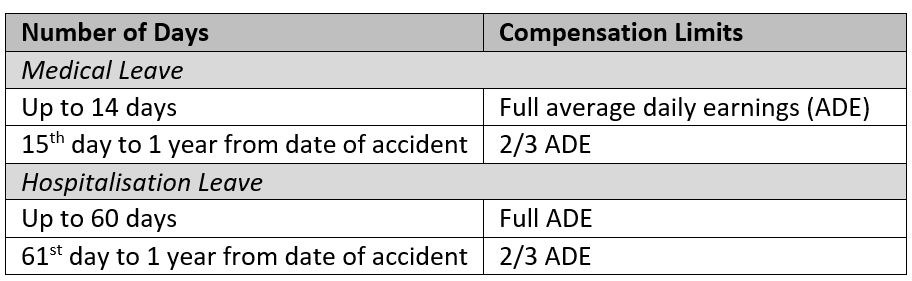
• Medical Expenses: This provides compensation for medical expenses related to an accident while delivering with Amazon Flex up to the maximum limit of SGD$53,000 or 1 year from the date of the accident, whichever comes first.
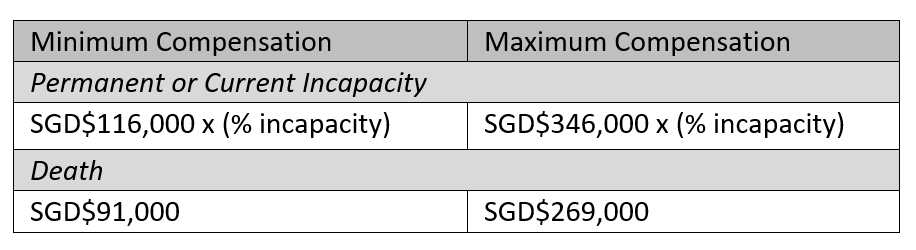
• Lump sum compensation for permanent incapacity, current incapacity or death: This provides compensation in case of permanent incapacity, current incapacity, or death up to the maximum limit.
Driving while tired or fatigued
Fatigue symptoms include:
- Frequent yawning
- Hard time keeping your eyes open
- Drifting out of your lane or difficulty maintaining steady speed
- Can't remember the last few minutes of driving
- Missing turns or exits
- Slower reaction times, such as delayed braking
Ways to prevent fatigue include:
- Take regular breaks: Even if you don’t feel tired, frequent breaks can prevent fatigue from building up.
- Stay hydrated: Try to drink water regularly to keep yourself energized and alert.
- Eat balanced snacks: Good nutrition helps maintain your energy and concentration.
- Stay safe in the heat: During heatwaves, keep your air conditioning within 7 degrees of the outdoor temperature to reduce the risk of heat stroke.
- Stretching to stay alert: Simple stretches during breaks can help you stay alert. Increased blood flow from movement can help combat fatigue.
What to do if you feel fatigued while delivering:
As an Amazon Flex delivery partner, you have the flexibility to take breaks during your delivery block to rest and recharge. For delivery blocks scheduled longer than 6 hours, a 30-minute unpaid break is automatically included. For delivery blocks scheduled longer than 9 hours, a 45-minute unpaid break is automatically included.
If you feel tired or experience any signs of fatigue while driving, find a safe spot to park your vehicle, ideally in the shade, and take a break.
Your delivery journey starts here
Ready for flexible earnings and a schedule that fits your life? Visit the Get Started page for onboarding steps or check out FAQ for answers to common questions.
Download the Amazon Flex app
Create an account to set your schedule, see your earnings upfront, and start delivering with confidence.